

Search Software
Search Software lets you explore your software inventory to uncover applications, validate workloads and improve coverage. Where Auto-Detect works top-down from patterns, Search Software works bottom-up: start from a known software package and find every server running it, then map those servers into a workload.
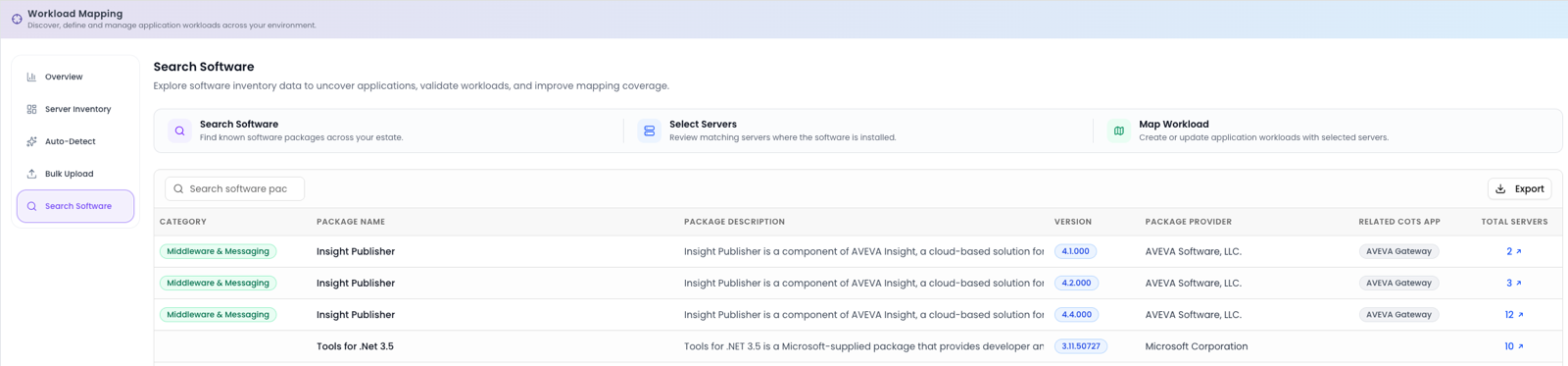
The three-step flow
A three-step flow runs across the top of the screen, showing exactly where you are:
Search Software
Type a package name, for example AutoCAD or SQL and Dr Migrate instantly finds every server in the estate running it.
Select Servers
Review the matching servers and select the ones that belong together as a workload.
Map Workload
Map the selected servers to an existing application, or create a new application for them, far faster than hunting through a spreadsheet.
The software table
Results appear in a table you can Export. Each row describes a discovered software package and how widely it's installed:
| Column | What it shows |
|---|---|
| Category | The software category the package falls into. |
| Package Name | The detected name of the software. |
| Package Description | A short description of the package. |
| Version | The version detected across servers. |
| Package Provider | The publisher or vendor. |
| Related COTS App | The off-the-shelf application the package maps to, if recognised. |
| Total Servers | How many servers run the package. |
Search Software is ideal for pinning down a specific product's footprint. Searching SQL instantly surfaces every database server; searching a line-of-business product name finds its hosts, then map them in a couple of clicks instead of cross-referencing a spreadsheet.
When to use it
Reach for Search Software when you know a product is in the estate and want to map it precisely, to validate that Auto-Detect caught everything, to track down the hosts of a specific application, or to close coverage gaps a known package can fill.
Next step
Use Search Software alongside Server Inventory to finish coverage. When the estate looks good, open Application Inventory in Estate Explorer.