

Plan
The Plan phase turns your analysis into a costed, sequenced migration plan. You define how you'll migrate, let Dr Migrate recommend a treatment for every workload, group those workloads into delivery waves, and model the cost and business case behind the move.
Plan is organised into two areas that work hand in hand:
Set a strategy, tune treatment preferences, assign 6R treatments and generate waves.
Model current vs future cost and build the business case from your actual plan.
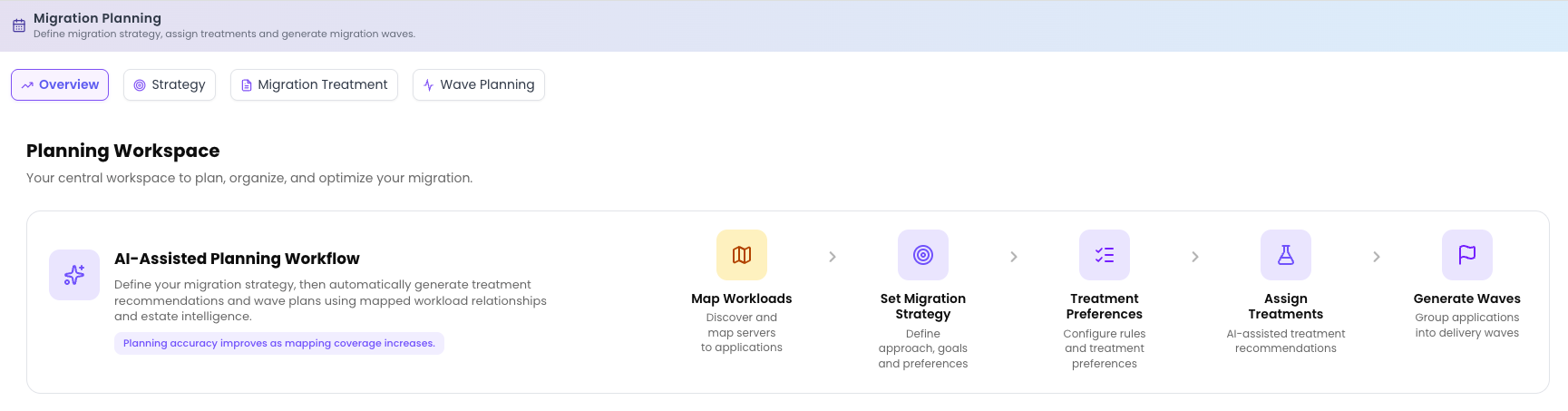
Migration Planning
Migration Planning is the AI-assisted workspace where the plan takes shape. You set an overarching strategy, tune the treatment preferences that act as guard rails, let Dr Migrate assign a 6R treatment to every workload, and finally generate waves ready for delivery. Accuracy improves as your workload mapping coverage increases.
TCO Analysis
TCO Analysis turns the plan into numbers. It models your current on-premises cost against the future cloud cost implied by your treatments, lets you compare scenarios side by side, and produces the business case you'll take to stakeholders. Because it's driven by your actual plan, the figures reflect your estate rather than generic assumptions.
Recommended flow
For the most accurate plan, work through the phase in this order:
Map workloads first
Coverage from Workload Mapping feeds everything else. The more you map, the better every recommendation that follows.
Set strategy with the customer
Agree the overarching approach: migrate as-is, light modernization, or modernization focused. This frames every downstream decision.
Tune treatment preferences with the account team
Set the guard rails: the modernisation target for each technology, agreed with the Microsoft account team and solution architects.
Generate the plan
Let Dr Migrate evaluate every server and technology and produce a full 6R treatment plan you can review.
Tune with the customer
Walk the recommendations through with the customer, override the handful that carry special business context, and regenerate.
Then wave planning
Group the treated, sized applications into sequenced delivery waves ready for execution and the business case.
Planning accuracy improves as mapping coverage increases. If your recommendations look thin, the quickest fix is usually more Workload Mapping.