

Custom Tags
Custom tags let you attach additional contextual metadata, such as ownership or business unit, to applications and servers to enrich your Digital Report.
Each tag has a Tag Key (the category, e.g. App Owner, Business Unit) and a Tag Value (the specific detail, e.g. Jason Smith). An unlimited number of Tag Keys can be created, however there are a number of pre-defined application tag keys, review the Common Custom Tags for a reference list.
Tags are set at either the Application or Server level, and can only be applied to resources already discovered in Dr Migrate.
Exporting the tag template
Open Data Sources
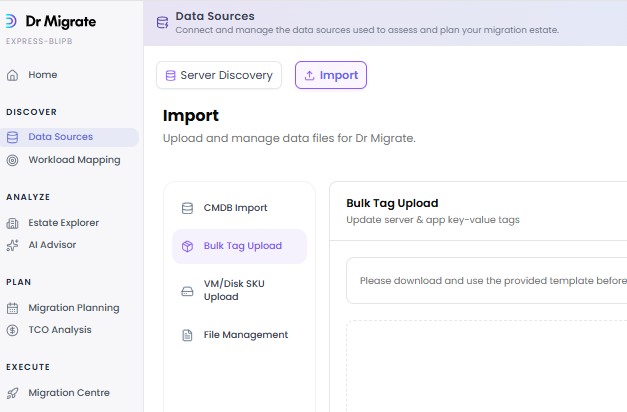
Go to Data Sources → Import → Bulk Tag Upload and click Download Template to generate the Bulk Tag export. Depending on environment size it may take 1–15 minutes; the button shows "Generating template..." while it runs, then a "Bulk Tag Template ready" panel with Download and Copy link actions.
Download
Once the template is ready, click Download to save the workbook, or use Copy link to open the secure URL in your browser.
Editing the Tag Export
Once downloaded, you can open the file in Microsoft Excel, you should make any edits, and save this file.
Filling out the Tag Export
The following illustration should be used while using the Bulk Tag template. When you download the template, you will automatically see what has been entered by Dr. Migrate so far.
The Tag Key for the first set of applications you see below is App Owner, and the Tag Value is Jason Smith.
It demonstrates that the app is owned by Jason Smith, the app owner. You will be able to filter by App Owners in Dr Migrate once this template has been uploaded.
| Tag Key | Tag Value |
|---|---|
| App Owner | Jason Smith |
| Business Owners | HR |
Important Notes When Editing Tags
Template Structure: Do not modify the template structure. The file must use the exact sheet name "Tag List" and maintain the original column headers. Any modifications to the template structure will cause the upload to fail.
Complete Tag Replacement: When you upload a tag export, all existing tags are replaced with the tags in your uploaded file. This means: - Tags not included in your upload will be removed - Tags in your upload will replace any existing tags with the same Tag Key - Ensure your export file contains all tags you want to keep, not just new ones
Duplicate Handling: If the same application or server has multiple rows with the same Tag Key, only the first occurrence will be used. Subsequent duplicates will be automatically removed during processing.
Empty Values: Rows with any empty cells will be automatically removed during upload. Ensure all columns (Tag Level, Application/Server Name, Tag Key, and Tag Value) have values for each row.
Server Name Matching: Server names are matched case-insensitively. The casing of server names in your template does not need to match exactly what appears in Dr. Migrate.
Unmatched Items: Applications or servers that don't exist in your Dr. Migrate environment will be silently skipped. Tags for these items will not be applied. Ensure all applications and servers referenced in your template have been discovered in Dr. Migrate.
Existing Tags: If a tag already exists for an application or server (same Tag Key), it will be updated with the new Tag Value. If it's a new tag, it will be added.
Uploading the Custom Tag Export
Marketplace
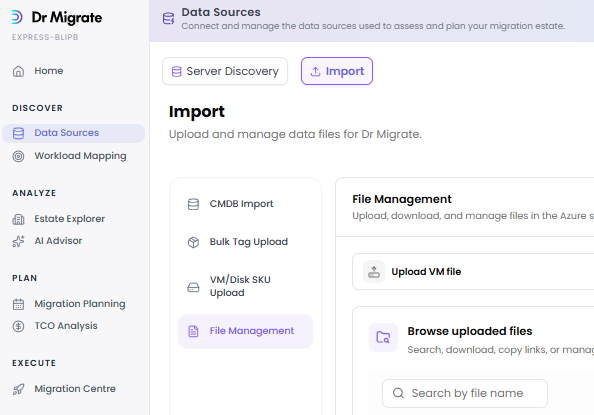
Upload file to Dr Migrate Storage
Please ensure that the file does not have any sensitivity labels or information protection rules applied to it. These restrictions affect the reading of the file.
Access the Secure Upload to Storage Account tab of File Management
You should first upload your completed tag export to a secure file storage solution, such as Azure Blob storage, and generate a secure sharing link for Dr Migrate to use.
Click here to learn more about using Azure Blob Storage to upload files ↗, and create SAS tokens ↗.
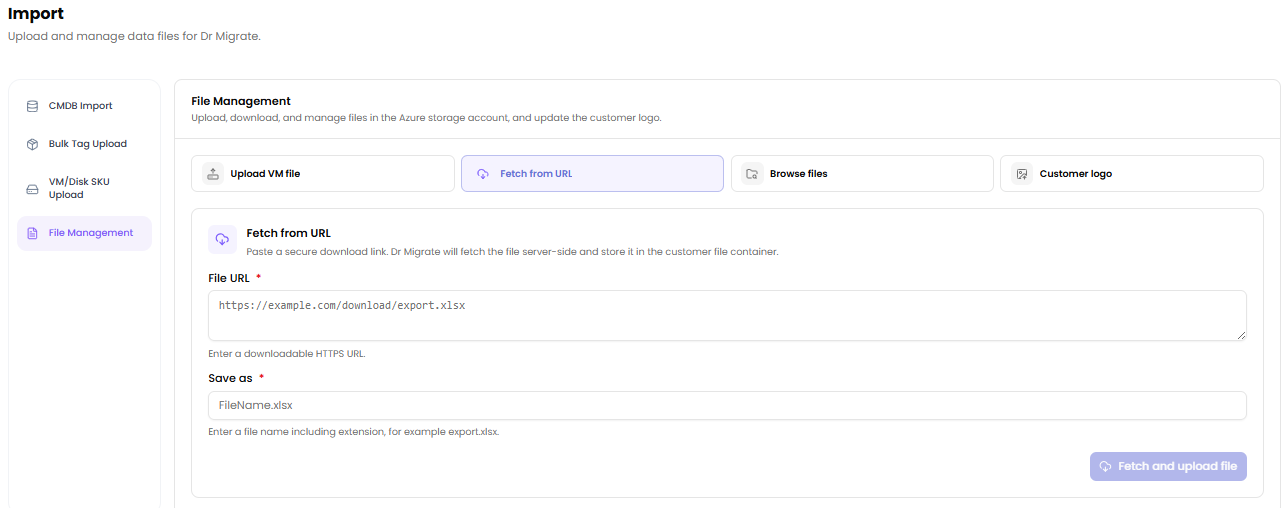
Simply create a SaS link for your uploaded file, and paste it into the provided area, provide a filename, and click submit.
Download Tag Export to Dr Migrate VM
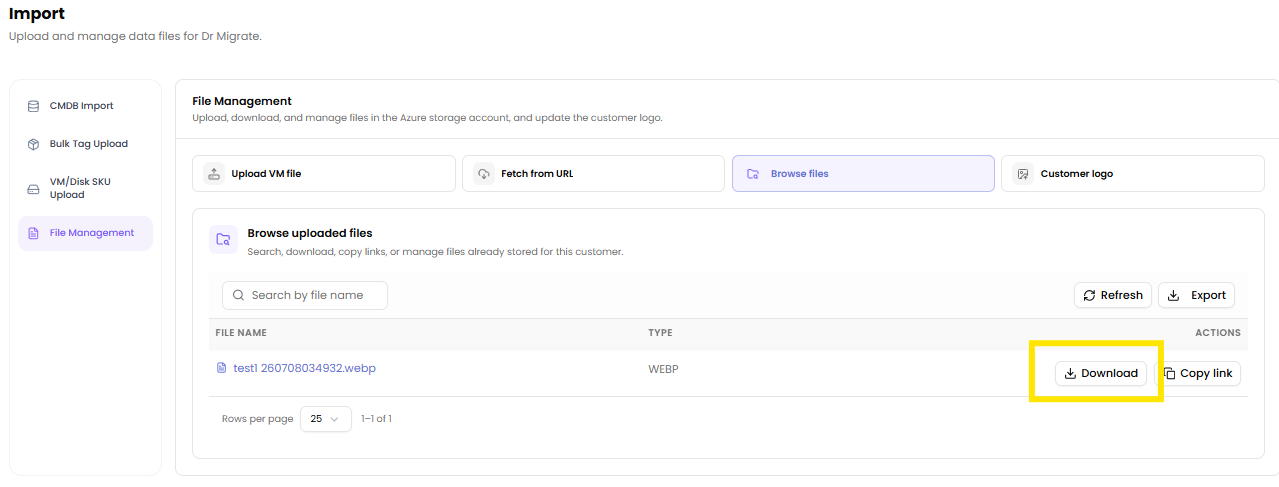
Click the Browse Files section and click the download button. Your Dr. Migrate files can be downloaded to Dr Migrate VM, and will be available in the downloads folder
Import Custom Tags
Please ensure that the file does not have any sensitivity labels or information protection rules applied to it. These restrictions affect the reading of the file.
Select the custom tag file, from the Downloads folder, and click submit.
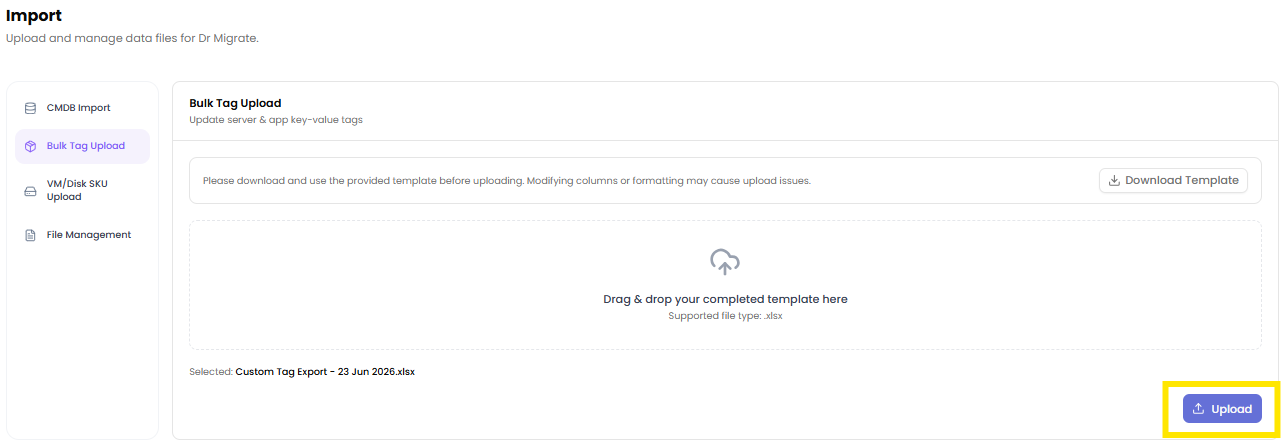
Depending on the size of the estate, this make take between 1-15 minutes, you will receive a notification once the process in complete.
Viewing Custom Tags
After uploading, and report refresh the data will then be processed by Dr. Migrate. They are viewable in both the Inventory chevron, under Advanced Filters, and the Advanced Digital Report.
Common Custom Tags
While any Tag/Value pair can be used as a custom tag, there are a number of common tags that can be used to define attributes of VM's and Applications.
| Field/Key | Meaning | Expected Value |
|---|---|---|
| Application Name | The name of the application | Custom application name |
| Description Or Comment | A description or comment regarding the application | Detailed application description |
| Application Owner | The individual responsible for the application | Name of the application owner |
| Application Owner Email | Contact email of the Application Owner | Email address of the application owner |
| App SME Name | The name of the Subject Matter Expert of the Application | Name of the lead subject matter expert |
| Function | The function/purpose of the application | 'IT Tool' or 'Business Application' |
| Type | Categorization of the application based on its sourcing | 'COTS/ISV' or 'In-House Custom Built' |
| Vendor Name | The company that provides the application or service | 'Advanced Systems Concepts' or other vendor name |
| COTS Installed software package | The specific commercial software package installed | 'ActiveBatch V12' or other software package |
| Vendor allows modernisation on Azure | Indicator if the vendor supports modernisation of their software on Azure | 'Yes' or 'No' |
| Vendor Url | The URL for the vendor's website | URL link to the vendor's website |
| PII Data | Indicates if the application interacts with Personally Identifiable Information | 'Yes' or 'No' |
| High Availability | Requirement for the application to be highly available | 'Yes' or 'No' |
| Disaster Recovery | Necessity for a disaster recovery plan for the application | 'Yes' or 'No' |
| App Criticality | The level of criticality of this application to the business | Critical, High, Medium, Low |
| App Sme Email | The Email of the Subject Matter Expert of the Application | Email address of the SME |
| App Owner Azure Knowledge | The level of Azure Knowledge of the Application Owner | None, Limited, Moderate, High |
| App Sme Azure Knowledge | The level of Azure Knowledge of the Subject Matter Expert | None, Limited, Moderate, High |
| App Type COTS Notes | Any Notes on the Vendor Application | Notes regarding the vendor application |
| App Type COTS Software Name | What is the name of the Vendor of the Application | Vendor software name |
| App Type COTS Vendor Name | What is the name of the version of the application installed | Vendor name |
| App Type COTS Version Installed | The version of the commercial software installed | Version number of the software |
| Backup Restore Policies | What are the Backup/Restore Policies for the Application | 6 Months, 1 Year, 2 Years, etc. |
| Business Unit | The organisational business unit that the application relates to | Name of the business unit |
| Current App Strategy | The current organisational strategy for this application | Strategy regarding the application's lifecycle |
| Health Documentation | Is there any documentation about the application currently | Lacking, Detailed |
| Health Stability | What is the average stability of the application currently? | Stable, Intermittent Issues, Unstable |
| Inherent Risk | What is risk level to migrating this application | None, Limited, Moderate, High |
| Materiality | What is the level of Materiality for the application | None, Limited, Moderate, High |
| Migration Drivers | The Drivers for Migration of this Application to Azure | Various drivers for migration |
| Resilience Data Retention | What Level of Data Retention is required for the application | 6 Months, 1 Year, 2 Years, etc. |
| Support Team Azure Knowledge | The level of Azure Knowledge of the Support Team | None, Limited, Moderate, High |
| Support Team Size | Is the Application supported by an Internal or External Support Team? | >5, >10, <10 |
| Supported By | Is the Application supported by a Internal or External Support Team? | Internally Supported, External Vendor |
| User Base | The size of the user base of the application | >10, >100, >250, >500, >1000, 1000 |